Skip to content
Decoratoradvice

Decoratoradvice

Where only the best advice will suffice!

  • Home
  • Decorate Your Home
  • Home Exterior
  • Home Tips & Guides
  • About Us
  • Contact Us
Watch Online

From Script to Sound: How Text-to-Voice AI Transforms Tech Content Production

Dpzhuk Znnkberin 4 min read
2355
From script to sound how text to voice ai transforms tech content production
In the digital age, the rapid growth of artificial intelligence (AI) has profoundly reshaped various industries, and one of the most significant advancements is in content creation. AI solutions development has accelerated improvements in algorithms, enabling more sophisticated and efficient AI-driven technologies, which have been particularly transformative in tech content production, where the need for fast, high-quality output has become essential. Text-to-voice (TTS) AI is among the most exciting innovations, a powerful tool that converts written text into realistic speech. This advancement streamlines production processes and opens new possibilities for accessibility, personalization, and scalability.

Let’s dive into how Text-to-Voice AI transforms tech content production and explore how tools like CapCut’s desktop video editor leverage this technology to enhance video creation.

The Rise of Text-to-Voice AI in Tech Content Production

Tech content creation often involves complex explanations, tutorials, product demonstrations, and reviews. These forms of content typically rely on a combination of written scripts and voiceovers to communicate information effectively. Traditionally, creating professional voiceovers required hiring voice actors or using pre-recorded tracks. However, the introduction of AI-powered TTS technology has made producing high-quality audio easier and more cost-effective without the need for a studio or a human voice actor.
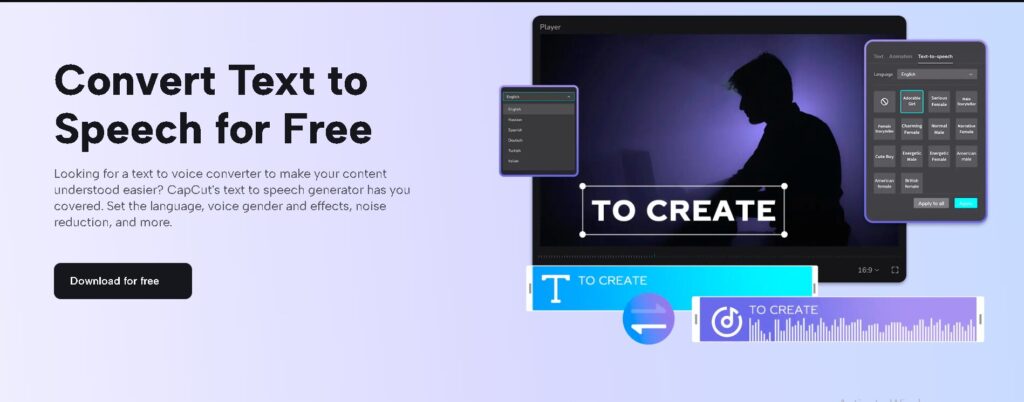
Image2

Text-to-speech AI analyzes written text and converts it into spoken words using machine learning algorithms. These systems have evolved to the point where the voice generated is so realistic that it’s often indistinguishable from human speech. Modern TTS systems can modulate tone, pitch, and speed by employing neural networks and deep learning techniques, making the synthetic voices sound more natural and engaging.

This has resulted in significant improvements in tech content production. Creators can now produce voiceovers quickly and efficiently, enabling faster video production and content publishing. Whether for explainer videos, tutorials, or instructional content, TTS AI can read scripts impeccably, ensuring that the tone and delivery match the intended message.

Key Benefits of TTS AI in Tech Content Production

  1. Cost and Time Efficiency: One of the most notable benefits of TTS AI is the cost savings. Hiring professional voice actors can be expensive, especially for large projects or ongoing content production. Additionally, scheduling voice recording sessions can take time. With TTS AI, content creators can eliminate the need for outsourcing voiceovers, saving time and money.
  2. Consistency and Flexibility: TTS AI provides consistent quality without the variations that human voice actors might have during multiple recording sessions. Creators can also tweak the voice settings, such as adjusting speed, pitch, and accent, to match the specific needs of their content. This flexibility allows tech content producers to tailor the delivery style to suit different types of videos and audiences.
  3. Accessibility: TTS AI has proven to be a game-changer for accessibility. Many people, including those with visual impairments or learning disabilities, benefit from content being available in audio form. In tech content production, this means that tutorials, guides, and reviews can be more inclusive, allowing users to consume information in a way that best suits their needs.
  4. Localization: Global audiences present a challenge for tech content creators. TTS AI can easily be adapted to different languages, accents, and dialects, making it easier to produce localized content. Whether targeting a European, Asian, or North American audience, creators can use TTS systems to generate voiceovers in multiple languages, ensuring the content remains relevant and relatable.

How CapCut Desktop Video Editor Uses TTS AI for Video Creation

CapCut, a popular free video editing software, has embraced Text-to-Voice AI in its desktop version to help users create content more efficiently. This feature enables content creators to convert written text into natural-sounding speech within the editing interface, streamlining the video production process. Let’s explore how the Text-to-Speech (TTS) feature works within CapCut and how creators can use it effectively.

How to Use CapCut Desktop Video Editor’s Text-to-Speech Feature

Step 1: Install CapCut and Open Your Project

You must first download and install CapCut on your desktop to get started.
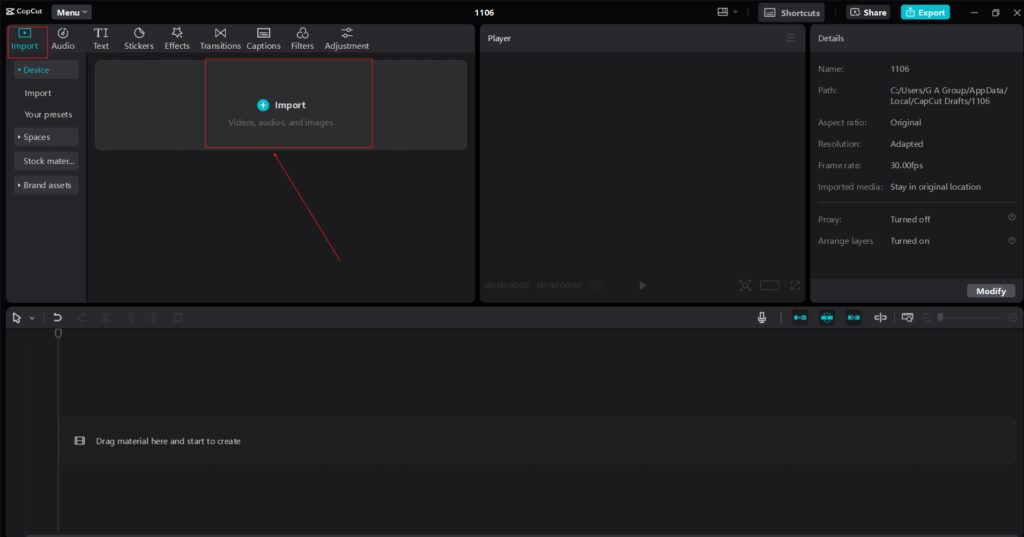
Image5

Once the software is installed, open it and create a new or existing project. The intuitive interface allows you to easily import video clips, images, or other media files you plan to use for your project.

Step 2: Add Your Script

After setting up your video timeline, you can add a text box by selecting the ‘Text’ tool. In the text box, write the script that you want to convert to speech.
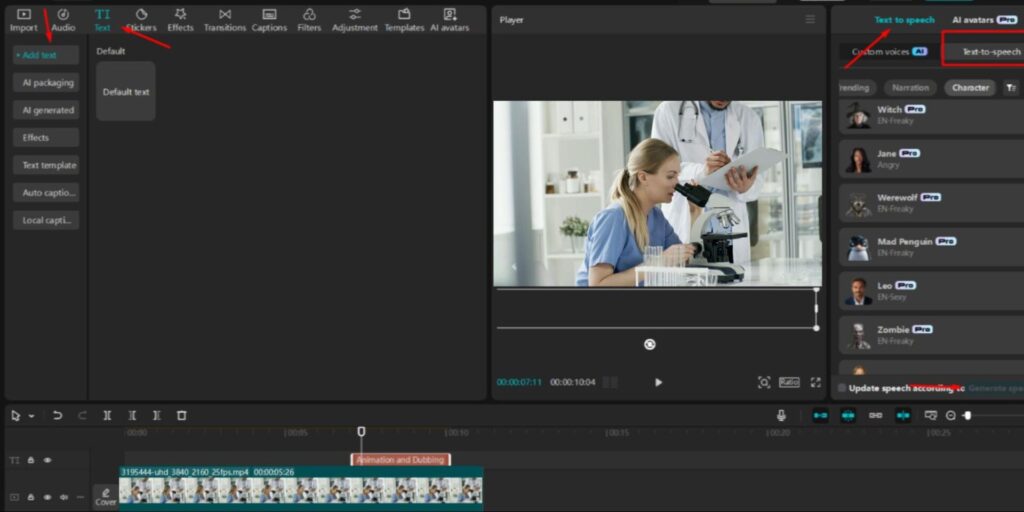
Image4

This could be an explanation of a product, a tutorial, or any other content you plan to turn into a voiceover. CapCut’s Text-to-Speech feature supports various voices, languages, and accents, so you can select the one that best fits your content’s tone. You can try features like AI Caption Generator to make your video more engaging.

Step 3: Convert Text to Speech and Fine-Tune the Output

Select the text box once your script is ready and find the Text-to-Speech option in the sidebar. Click to generate the speech, and CapCut instantly converts your written script into audio.
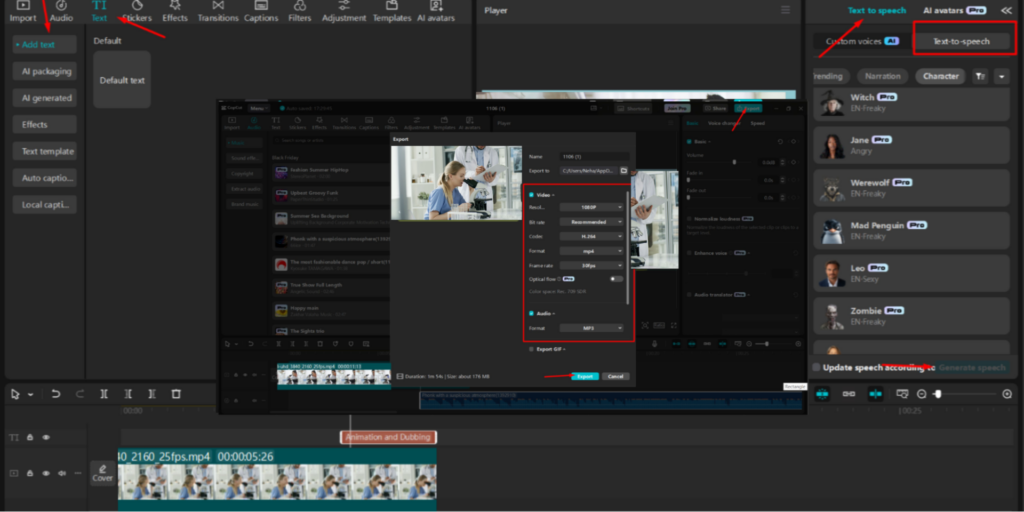
Image1

You can listen to the generated voiceover and adjust the settings if necessary. You can fine-tune the pitch, speed, and tone of the voice to suit the specific style of your video. Afterward, you can sync the speech with your video timeline and adjust the audio or video elements.

Conclusion

Text-to-speech AI is revolutionizing how tech content is produced, providing an efficient, scalable, and cost-effective solution for creating voiceovers. Tools like CapCut’s desktop video editor harness this technology, allowing creators to quickly streamline their production processes and produce high-quality content. As AI technology continues to evolve, the potential for Text-to-Voice AI in content creation is vast, offering greater accessibility and localization options while making video production more flexible and efficient than ever before. Whether you’re a tech content creator, educator, or marketer, embracing TTS AI will undoubtedly enhance how you connect with your audience.

Tags: home-slider

Post navigation

Previous How Acoustic Spray Contributes To A Quiet And Stylish Living Environment
Next Bring Back the Shine: How ShineOn’s Marble Polishing Transforms Your Space

Trending

How Smart Home Trends Modernize Plumbing Businesses 1

How Smart Home Trends Modernize Plumbing Businesses

Abbukkhar Kangharnnia
Selling an Older Atlanta Home? Updates That Preserve Character While Appealing to Modern Buyers 2

Selling an Older Atlanta Home? Updates That Preserve Character While Appealing to Modern Buyers

Avedyn Phytes
How to Create a Cozy Home for Fall Without Buying Everything New 3

How to Create a Cozy Home for Fall Without Buying Everything New

Avedyn Phytes
Why More Homeowners and Renters Are Turning to Rechargeable Lighting for Easy DIY Upgrades 4

Why More Homeowners and Renters Are Turning to Rechargeable Lighting for Easy DIY Upgrades

Abbukkhar Kangharnnia
Is a 12000 BTU Mini Split the Right Choice for Your Space? 5

Is a 12000 BTU Mini Split the Right Choice for Your Space?

Abbukkhar Kangharnnia
How to Match Bathroom Vanity Lighting With Your Mirror and Vanity Size 6

How to Match Bathroom Vanity Lighting With Your Mirror and Vanity Size

Avedyn Phytes

Related Stories

What to Ask Before Agreeing to a Design Brand Collaboration What to Ask Before Agreeing to a Design Brand Collaboration
5 min read

What to Ask Before Agreeing to a Design Brand Collaboration

Dpzhuk Znnkberin 96
How to Verify a Partnership Request from DecoratorAdvice.com How to Verify a Partnership Request from DecoratorAdvice.com
7 min read

How to Verify a Partnership Request from DecoratorAdvice.com

Dpzhuk Znnkberin 100
Ways to Measure Results from a Home Decor Content Partnership Ways to Measure Results from a Home Decor Content Partnership
5 min read

Ways to Measure Results from a Home Decor Content Partnership

Dpzhuk Znnkberin 105
How to Disclose Commercial Relationships in Decor Content How to Disclose Commercial Relationships in Decor Content
5 min read

How to Disclose Commercial Relationships in Decor Content

Dpzhuk Znnkberin 112
Affiliate Partnerships vs. Sponsored Features: What’s the Difference? Affiliate Partnerships vs. Sponsored Features: What's the Difference?
4 min read

Affiliate Partnerships vs. Sponsored Features: What’s the Difference?

Dpzhuk Znnkberin 111
How Designers Can Pitch a Collaboration to DecoratorAdvice How Designers Can Pitch a Collaboration to DecoratorAdvice
6 min read

How Designers Can Pitch a Collaboration to DecoratorAdvice

Dpzhuk Znnkberin 117

you may like

Selling an Older Atlanta Home? Updates That Preserve Character While Appealing to Modern Buyers
4 min read

Selling an Older Atlanta Home? Updates That Preserve Character While Appealing to Modern Buyers

Avedyn Phytes 56
Atlanta’s older homes often come with the kind of details newer construction tries to recreate: original hardwood...
Read More
How to Create a Cozy Home for Fall Without Buying Everything New

How to Create a Cozy Home for Fall Without Buying Everything New

Avedyn Phytes
How to Match Bathroom Vanity Lighting With Your Mirror and Vanity Size

How to Match Bathroom Vanity Lighting With Your Mirror and Vanity Size

Avedyn Phytes
Bathroom Remodeling Checklist: Vanity, Lighting, Storage & Fixtures

Bathroom Remodeling Checklist: Vanity, Lighting, Storage & Fixtures

Avedyn Phytes
Best Montessori Floor Beds: The Best Move After a Crib 

Best Montessori Floor Beds: The Best Move After a Crib 

Avedyn Phytes

Thanks to our partners!

Slotozilla

CasinoFrog

Interesting Links

slot online

decoratoradvice.com
  • Home
  • Privacy Policy
  • Terms & Conditions
  • About Us
  • Contact Us
© 2026 decoratoradvice.com | Powered by DecoratorAdvice | 501 7th Avenue, New York NY 10018
We use cookies on our website to give you the most relevant experience by remembering your preferences and repeat visits. By clicking “Accept”, you consent to the use of ALL the cookies.
Do not sell my personal information.
Cookie SettingsAccept
Manage consent

Privacy Overview

This website uses cookies to improve your experience while you navigate through the website. Out of these, the cookies that are categorized as necessary are stored on your browser as they are essential for the working of basic functionalities of the website. We also use third-party cookies that help us analyze and understand how you use this website. These cookies will be stored in your browser only with your consent. You also have the option to opt-out of these cookies. But opting out of some of these cookies may affect your browsing experience.
Necessary
Always Enabled
Necessary cookies are absolutely essential for the website to function properly. These cookies ensure basic functionalities and security features of the website, anonymously.
CookieDurationDescription
cookielawinfo-checkbox-analytics11 monthsThis cookie is set by GDPR Cookie Consent plugin. The cookie is used to store the user consent for the cookies in the category "Analytics".
cookielawinfo-checkbox-functional11 monthsThe cookie is set by GDPR cookie consent to record the user consent for the cookies in the category "Functional".
cookielawinfo-checkbox-necessary11 monthsThis cookie is set by GDPR Cookie Consent plugin. The cookies is used to store the user consent for the cookies in the category "Necessary".
cookielawinfo-checkbox-others11 monthsThis cookie is set by GDPR Cookie Consent plugin. The cookie is used to store the user consent for the cookies in the category "Other.
cookielawinfo-checkbox-performance11 monthsThis cookie is set by GDPR Cookie Consent plugin. The cookie is used to store the user consent for the cookies in the category "Performance".
viewed_cookie_policy11 monthsThe cookie is set by the GDPR Cookie Consent plugin and is used to store whether or not user has consented to the use of cookies. It does not store any personal data.
Functional
Functional cookies help to perform certain functionalities like sharing the content of the website on social media platforms, collect feedbacks, and other third-party features.
Performance
Performance cookies are used to understand and analyze the key performance indexes of the website which helps in delivering a better user experience for the visitors.
Analytics
Analytical cookies are used to understand how visitors interact with the website. These cookies help provide information on metrics the number of visitors, bounce rate, traffic source, etc.
Advertisement
Advertisement cookies are used to provide visitors with relevant ads and marketing campaigns. These cookies track visitors across websites and collect information to provide customized ads.
Others
Other uncategorized cookies are those that are being analyzed and have not been classified into a category as yet.
SAVE & ACCEPT